
Eugene Moxley's
Class Assignment for
COSC 324.SG1 - Fall 2011
Designing for Humans
Taught by Professor Kathleen Austin, with the
University of Baltimore at The Universities at Shady Grove
Help Page - Download, Install & Run

XNA Game for the PC
Sorry Mac users, this is a PC game only!
For more information on what this is about click here.
- Download the file at the following link named: Testing_Sonnys_Poker.zip
This is a compressed or zipped folder that holds three items down one level.
Open this zipped folder to uncompress and see these files (two files and a folder).
- Double-click on the file named setup.exe it should open and run.
A Security Warning window should pop up saying that, "The publisher could not be verified."
- Click on the Run button to start this installation.
A small window will appear saying Launching Application and Verifying application requirements.
This will be followed by one of several possible things:
- Another Security Warning asking if you, "Are sure you want to install this application?"
Click on the Install button. A window should open saying "Installing ..."
A window will open with the title, Sonny's Poker for PC that allows you to play the game.
This is the result that we are hoping for! See the notes at the bottom of the page.
THE GOAL while playing: Cashout with $100 or more.
ONE LAST THING: Please remember to do the Questionnaire Survey once you are finished playing. Thank you!
- I am hoping that this does not happen, but there is a good possibility that an error will occur. You might get a window similar to the one below. Instead of BreakoutClone it would say Sonny's Poker for PC and instead of HiDef profile it would say Reach profile:
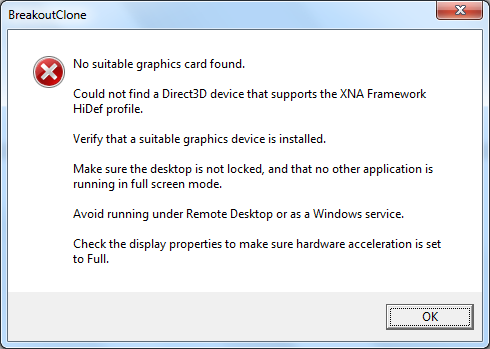
The Microsoft program that this game was made in seems to throw this error even if your hardward is just a little bit older. There may not be a way around it as I have been looking on the forums and cannot find one. I wish that I had made this game using an earlier version of XNA to avoid this problem.
Please contact me (eugene.moxley2@ubalt.edu or at 301.869.2552) if you get this or any other error and maybe I can bring the game to you.
- Another Security Warning asking if you, "Are sure you want to install this application?"
PLEASE NOTE: Once the folder has been unzipped the game will NOT work if you move the folder or any of its files to another location on your harddrive.
When you are done playing, you can remove the game by going into your Control Panel to Uninstall or change a program. Most likely this has been installed in your Downloads folder for whichever browser you used.